

Email Extractor Online — Free Bulk Email Address & Domain Extractor from Text
Extract, validate, organize, and export email addresses instantly with ToolSphare’s free online email extractor. Built for marketers, sales development reps, recruiters, developers, and researchers, this browser-based email extractor tool scrapes clean email addresses from unstructured text, CSV spreadsheets, PDF documents, Outlook EML messages, HTML code, and contact records. Process millions of characters in milliseconds, automatically strip duplicates, extract contact names from email handles, separate domains, detect obfuscated formats (such as "name [at] domain [dot] com"), and export clean lists to TXT, CSV, JSON, or Outlook BCC. 100% private client-side processing keeps your proprietary lead data completely safe on both mobile and laptop devices.
Email Extractor Online Workspace
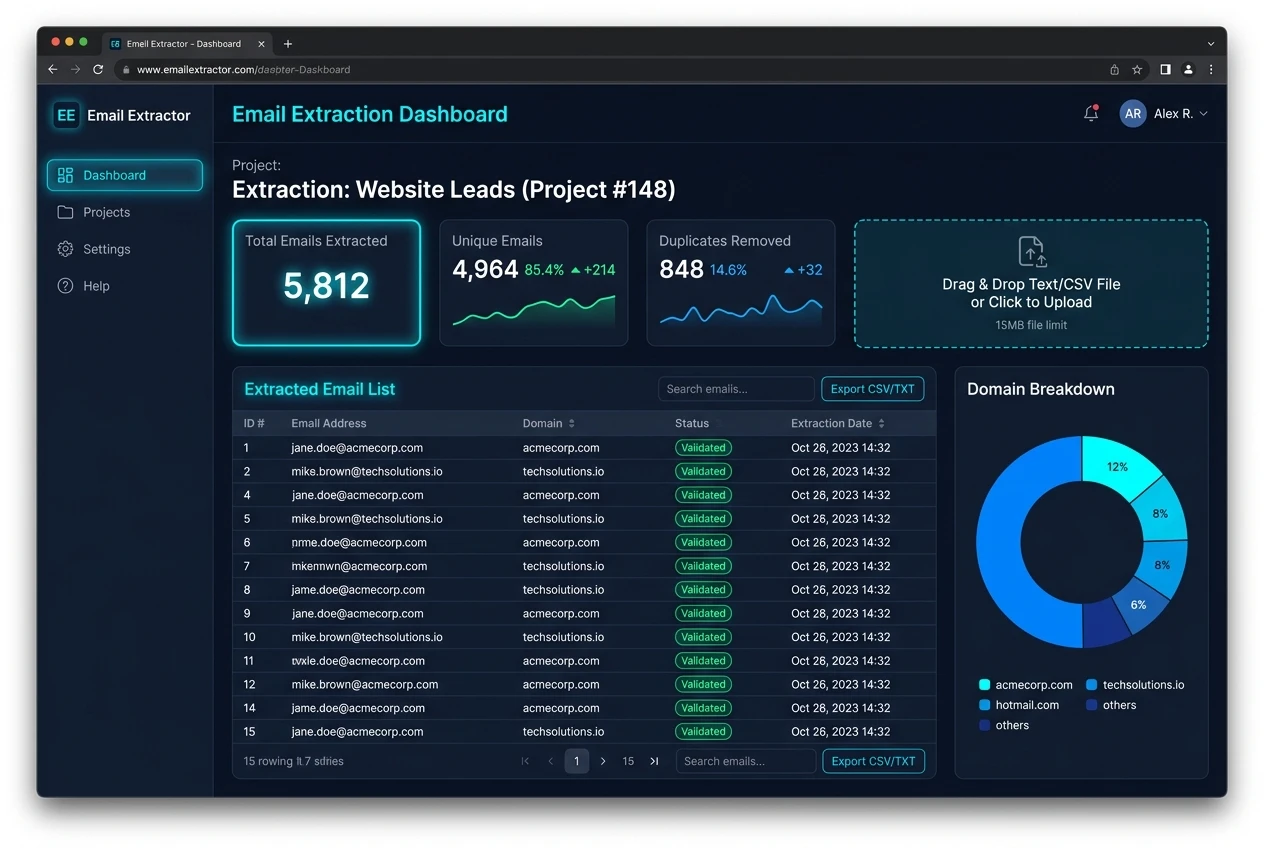
How to Use Email Extractor
- Paste your unformatted text, website source code, or contact notes into the "Text & Web Paste" input, or switch to "File & Document Scanner" to drop a .TXT, .CSV, .PDF, .EML, or .VCF file.
- Choose your extraction rules: enable "Remove Duplicates", "De-obfuscate [at] formats", "Parse Names", and select whether to filter out free webmail providers (Gmail, Yahoo, Hotmail) for B2B lists.
- Click "Extract Emails Now". The engine scans the source using RFC-5322 regex validation and displays metrics including total matches, unique emails, duplicates removed, and domain counts.
- Review the extracted data in the formatted text box or switch to the interactive "Data Table" view to search, inspect contact names, and verify role-based mailboxes.
- Export your clean email list using "Copy All", "Copy for Outlook / BCC" (semicolon delimited), or download structured files in TXT, CSV, or JSON format.
Email Extractor Features & Capabilities
- Instant bulk email extraction: parse thousands of email addresses from text, raw code, and documents in milliseconds
- Multi-format file scanner: upload and extract emails directly from .TXT, .CSV, .TSV, .HTML, .JSON, .EML, .VCF, and .PDF files
- Smart de-obfuscation engine: detects and converts anti-bot formats like "user [at] company [dot] com", HTML entities, and URL encodings
- Contact name extractor: automatically parses readable first and last names from email handles (e.g., alex.taylor@domain.com → Alex Taylor)
- Combined email & phone number extractor: capture mobile, international, and local phone numbers alongside email addresses
- Domain extractor & ESP breakdown: group emails by domain, calculate root domain frequency, and analyze ESP distribution
- Quality checker & role mailbox detector: identifies department addresses (support@, admin@, sales@) and verifies RFC syntax validity
- 100% private client-side processing: your data never touches a remote server, ensuring total GDPR and corporate confidentiality
What Does Email Extractor Mean & How Browser Extraction Works
An email extractor (frequently searched as email extractor online, email exstractor, extratingo, e mail extractor, or email extrator) is a specialized software tool designed to locate, parse, and isolate valid email addresses embedded within large bodies of unstructured text, web pages, or local data files. Whether you are reviewing customer feedback, parsing directory files, or compiling outreach lists, manually copy-pasting addresses is agonizingly slow and error-prone. An automated email extractor tool solves this bottleneck by scanning the document with high-speed pattern-matching algorithms.
Under the hood, our online email extractor utilizes regular expressions conforming to RFC-5322 standards. The parser identifies candidate strings matching the format "local-part@domain.tld", verifies that domain labels and top-level domains adhere to Internet Assigned Numbers Authority (IANA) rules, and strips away surrounding punctuation like commas, brackets, quotes, and HTML tags. By executing these calculations entirely in client-side JavaScript via your web browser, our free email extractor achieves microsecond speeds on both mobile and laptop workstations without sending sensitive customer contacts over external networks.
How Can I Extract Email Addresses from Text, Files (CSV, PDF, EML) & Websites
Extracting emails from modern digital files requires versatility, as business contacts are often trapped across different document formats. Here is how you can extract emails from any medium using this tool:
1. Extract emails from text: Paste any block of text—such as chat logs, forum threads, meeting minutes, or sales notes—into the text area. The extractor parses every email address from text online instantly, normalizes letter casing, and removes redundant duplicate entries.
2. Extract emails from CSV and Excel spreadsheets: If you have an exported CRM database or spreadsheet with mixed columns, upload the .csv or .tsv file into our file scanner. The engine parses the tabular stream, separates email addresses from contact records, and allows you to download a clean CSV with organized headers.
3. PDF email extractor: Portable Document Format (PDF) files often store text within compressed binary streams. Our tool features an in-browser PDF text extractor that parses stream objects to retrieve email addresses from contracts, whitepapers, resumes, and invoices without requiring Adobe Acrobat.
4. Outlook email address collector & .EML extractor: When working with exported email archives (.eml or .msg files), our parser inspects the message headers and message body, collecting all sender, recipient, CC, and body email addresses in a unified list.
5. Email extractor from website: To scrape emails from a live web page, you can copy the page source code (Ctrl+U / Cmd+Option+U) and paste it into the extractor, or use our 1-click Chrome bookmarklet to crawl and capture all addresses displayed on the active tab.
Advanced Features: Email and Phone Number Extractor, Name Parser & Domain Separator
Modern outbound campaigns require more than just raw email addresses; they need enriched, actionable contact intelligence. ToolSphare’s email extractor goes far beyond basic sample tools by incorporating multi-attribute extraction and hygiene capabilities:
• Extract name from email address: Email addresses frequently contain personal names (such as "first.last@company.com", "sarah_connor@domain.org", or "bruceWayne@enterprise.com"). Our heuristic name parser decodes these naming conventions, separates first and last names, and formats them with proper title capitalization, saving hours of manual data entry for cold outreach personalization.
• Email and phone number extractor: Switch on the telephone extractor option to locate international E.164 and localized telephone numbers alongside emails. The engine identifies country dialing codes, area codes, and standard phone patterns, giving you a full contact card for every lead.
• Domain extractor from email & ESP separator: Understand who your recipients are by grouping emails by domain. Our domain breakdown bar displays the exact volume per domain, separating free webmail providers (such as Gmail, Yahoo, Outlook, and iCloud) from verified B2B corporate domains. You can easily click any domain to filter the list or use the B2B toggle to exclude generic personal mailboxes entirely.
• Email separator & custom delimiters: Ready to send a bulk email campaign? Use the separator dropdown to format your output with commas, newlines, tabs, pipes, or semicolons. Semicolon separation is specially calibrated for Microsoft Outlook and Gmail BCC fields, allowing you to paste hundreds of validated addresses directly into your email client.
How to Add an Email Extractor to Chrome: Extensions vs. In-Browser Tools
Many professionals search for "how do I add an email extractor to Chrome?", "chrome email extractor", or "email extractor for chrome". While Chrome Web Store extensions are widely used, they carry distinct trade-offs that every security-conscious user should understand.
To add an email extractor extension to Chrome from the Chrome Web Store: open Chrome, visit the Web Store, search for "email extractor extension" or "email address extractor add on for gmail", click "Add to Chrome", and grant the requested permissions. However, third-party extensions often require broad permissions ("Read and change all your data on all websites you visit"), which can expose sensitive browsing activity, corporate intranets, and personal passwords to third-party developers.
In contrast, our in-browser ToolSphare email extractor provides a safer, zero-install alternative. By adding our lightweight JavaScript bookmarklet to your Chrome bookmarks bar, you can extract emails from any active webpage with a single click. The script runs entirely within your local browser sandbox, inspects the current DOM, copies the emails to your clipboard, and requires zero permanent permissions or background tracking.
What Is the Best Email Extractor Software? Desktop vs. Free Online Tools
When searching for the best email extractor software or top 5 email extractor programs, users typically encounter three major categories of software: downloadable desktop software, subscription-based API scrapers, and in-browser online tools.
1. In-Browser Online Email Extractors (ToolSphare): Combining zero installation, cross-platform compatibility (Windows, macOS, Linux, iOS, Android), and complete privacy, ToolSphare represents the gold standard for quick, secure list hygiene and file parsing. You receive full functionality—including PDF extraction, de-duplication, and CSV export—100% free with no sign-up or credit card required.
2. Desktop Software (e.g., Email Extractor 1.6, Email Extractor 1.6.1, Turbo Email Extractor, Emailx): Classic desktop utilities such as Email Extractor 1.6 (often searched as emailextractor 1.6 or email extractor freeware) were popular in previous decades for crawling local hard drives. However, these programs frequently lack updates, require Windows administrative rights, and are often flagged by modern antivirus scanners due to bundled installers or outdated runtimes.
3. Enterprise SaaS & Marketing Suites (e.g., Semrush, Hunter, ZoomInfo, Apollo): Enterprise suites offering email crawler, email scraper online, and email extractor checker semrush functionalities offer deep database enrichment. However, they cost between $50 and $500 per month, enforce strict credit limits, and are designed for database prospecting rather than parsing your own raw text files, emails, and PDFs.
For everyday tasks where you already have unformatted text, spreadsheets, documents, or websites to extract emails from, our free online email extractor delivers the fastest, cleanest, and most reliable workflow.
Email Extractor Frequently Asked Questions
How can I extract email?
To extract email addresses, paste your text, document content, or website HTML into the ToolSphare Email Extractor source box, or upload a local file (.txt, .csv, .pdf, .eml). Choose whether you want to remove duplicates, parse contact names, and decode obfuscated addresses like "name [at] domain.com". Click "Extract Emails Now". The engine scans the text using RFC-5322 regex algorithms, extracts all valid email addresses, and presents a deduplicated list that you can sort by domain or email, inspect in an interactive table, and copy or download as TXT, CSV, or JSON.
What does email extractor mean?
An email extractor (also known as an email scraper, email parser, or mail extractor) is a software utility that automatically identifies, extracts, and organizes email addresses from raw, unstructured data sources such as plain text, HTML source code, spreadsheets, PDF documents, or email messages. It uses pattern recognition (regular expressions) to detect valid email syntax, strips away surrounding noise and punctuation, eliminates duplicates, and formats the output for easy use in email marketing, sales outreach, CRM databases, or recruitment workflows.
How do I add an email extractor to Chrome?
To add an email extractor to Google Chrome, you have two options: 1) Install a Chrome Extension from the Chrome Web Store by visiting chrome.google.com/webstore, searching for an email extractor extension, and clicking "Add to Chrome" (ensure you verify the extension permissions and privacy policy first). 2) Use ToolSphare’s 1-click Bookmarklet (recommended for security): navigate to the "Chrome Extension & Web Crawler" tab on this tool, drag the "Extract Page Emails" button directly to your Chrome Bookmarks Bar (Ctrl+Shift+B). Whenever you are on any webpage with contact info, simply click the bookmarklet to extract, deduplicate, and copy all emails on that page without installing any invasive software.
What is the best email extractor software?
The best email extractor software depends on your specific workflow: For fast, free, and secure extraction from text, CSV, PDF, and EML files without software installation, ToolSphare Email Extractor is widely considered the top free online tool because it runs 100% in-browser with zero data retention. For legacy offline file crawling on Windows, utilities like Email Extractor 1.6 and Turbo Email Extractor were historically popular. For large-scale B2B cold prospecting and domain search where you need to discover emails from company names, dedicated enterprise tools like Hunter.io, Semrush, Apollo, and Snov.io lead the market. For most users, ToolSphare provides the best balance of speed, multi-format file parsing, name extraction, and privacy.
Can I extract email addresses from PDF, CSV, and EML files?
Yes. ToolSphare’s email extractor includes a built-in file scanner that supports plain text (.txt), comma-separated spreadsheets (.csv, .tsv), HTML web pages, JSON files, vCard contacts (.vcf), Outlook/Apple mail messages (.eml), and PDF documents (.pdf). All file ingestion is performed client-side inside your browser, meaning your proprietary documents are never uploaded to any remote server.
How does ToolSphare protect my data and privacy during email extraction?
ToolSphare processes 100% of your data client-side within your local browser sandbox using modern JavaScript FileReader and Web APIs. Unlike cloud-based extractors that store your lists on external databases, your text, documents, extracted emails, and phone numbers never leave your device. This makes the tool fully compliant with GDPR, CCPA, and enterprise privacy regulations.
