

Free Online JSON Formatter — Beautify, Validate & Minify JSON
Paste your JSON into the editor and choose Format to make nested objects and arrays instantly readable, or Minify to strip unnecessary whitespace for fast HTTP network delivery. Built for software engineers, API developers, data analysts, and QA specialists, ToolSphare’s free JSON formatter validates syntax against strict RFC 8259 specifications, pinpointing missing commas, unescaped quotes, and mismatched brackets in real time. Processing takes place 100% client-side in your browser memory, guaranteeing that proprietary API payloads, customer records, and database secrets are never transmitted across the network.
JSON Formatter Online Workspace
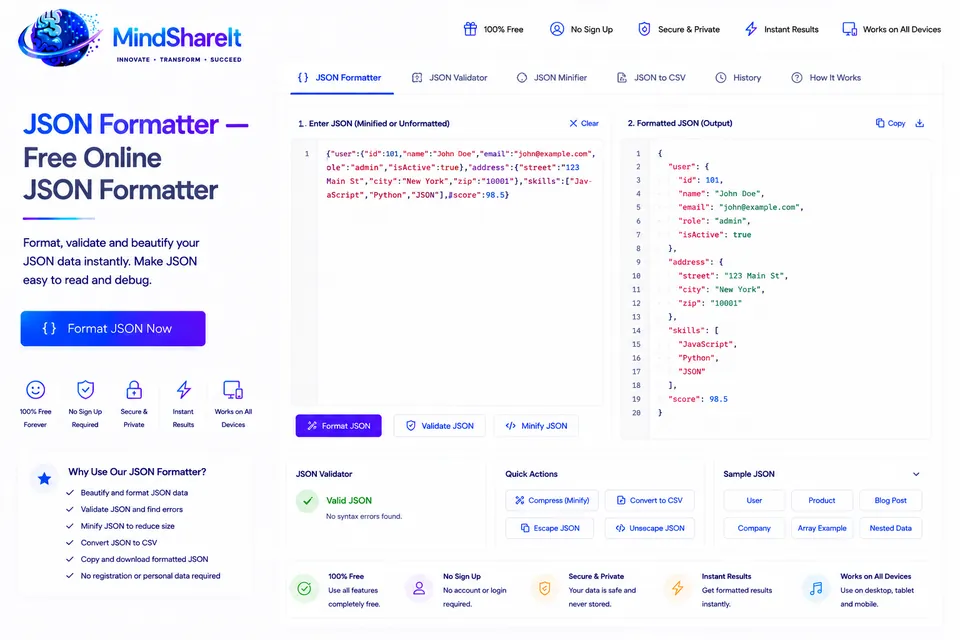
How to Use JSON Formatter
- Paste your raw, minified, or unformatted JSON string into the left input editor, or click "Load Sample" to test the tool.
- Choose your formatting options: select 2-space indentation, 4-space indentation, or click "Minify" to compress the JSON string into a single line.
- Review the real-time syntax validation status. If your JSON contains syntax errors, the built-in linter highlights the exact line and character position of the issue.
- Click "Beautify JSON" to produce formatted, syntax-highlighted output with collapsible object trees.
- Copy the clean output to your clipboard with one click, or download it as a validated .json file.
JSON Formatter Features & Capabilities
- Real-time syntax validation: pinpoint syntax errors, unclosed brackets, and illegal trailing commas instantly
- Two-way formatting: easily switch between human-readable beautification (2 or 4 spaces) and compact production minification
- Collapsible tree view: expand and collapse deeply nested objects and arrays to inspect complex data structures effortlessly
- Full UTF-8 & Unicode support: handles multi-language strings, emojis, and escaped Unicode sequences flawlessly
- 100% private in-browser processing: zero network transmission — your sensitive API data stays strictly on your machine
- One-click clipboard export: copy formatted or minified JSON, or download directly as a .json file
How Online JSON Formatting & Validation Works
JavaScript Object Notation (JSON) is the universal data interchange format powering modern REST APIs, GraphQL endpoints, configuration files, and NoSQL databases. Because production systems often serialize JSON into compact, single-line strings without whitespace to conserve network bandwidth, reading or debugging raw JSON logs by eye is nearly impossible. A JSON formatter parses the string into an Abstract Syntax Tree (AST) conforming to RFC 8259 and ECMA-404 standards, then reconstructs it with consistent indentation, newlines, and color-coded syntax highlighting.
ToolSphare’s JSON formatter runs entirely client-side using native JavaScript engine parsing. This means processing is instantaneous even for multi-megabyte payloads, with zero latency from server round-trips and complete immunity to man-in-the-middle network interception.
Beautify vs. Minify JSON: When to Use Each Mode
Understanding when to format versus minify JSON is essential for efficient development and production deployment:
• Beautify JSON (Pretty-Print): Adds structured indentation (typically 2 or 4 spaces) and line breaks after each key-value pair and array element. Use beautify during active development, code reviews, debugging API response bodies, or inspecting configuration files like package.json or tsconfig.json.
• Minify JSON: Strips all extraneous whitespace, line breaks, and indentation tabs while preserving exact data types and syntax validity. Minified JSON reduces payload size by up to 30–50%, decreasing HTTP response times, saving mobile bandwidth, and minimizing storage overhead in document databases like MongoDB and CouchDB.
Common JSON Syntax Errors and How to Resolve Them
Because JSON enforces a much stricter specification than JavaScript object literals, minor syntax oversights frequently break API parsers. Here are the most common syntax errors and how our formatter helps you fix them:
1. Trailing commas: Placing a comma after the final item in an object {"a": 1,} or array [1, 2,] is valid in modern JavaScript but strictly illegal in standard JSON. Our validator flags trailing commas immediately.
2. Single quotes instead of double quotes: JSON string literals and object keys MUST be enclosed in double quotes ("key": "value"). Single quotes ('key': 'value') will fail parsing.
3. Unquoted keys: Object keys must always be enclosed in double quotes. Writing {id: 101} instead of {"id": 101} is a frequent copy-paste mistake.
4. Unescaped control characters: Raw tabs, unescaped double quotes within strings, or unescaped backslashes must be properly escaped with backslashes (\", \n, \\).
Data Privacy Guarantee: Why Client-Side Processing Is Critical
Many third-party online developer tools upload your input text to cloud backend servers for processing, creating severe security and compliance liabilities when formatting payloads containing user passwords, API bearer tokens, payment data, or proprietary business logic.
ToolSphare takes security seriously: our JSON Formatter operates completely in client-side memory using the browser’s native JSON parsing engine. Your payload never leaves your device, is never logged in server databases, and is never exposed to third-party tracking scripts, ensuring total compliance with GDPR, HIPAA, and internal corporate data privacy policies.
JSON Formatter Frequently Asked Questions
Is this JSON formatter completely free?
Yes. ToolSphare’s JSON formatter is 100% free with no usage limits, no premium paywalls, and no account registration required.
Does this tool support large JSON files?
Yes. Because parsing runs in client-side browser memory, you can format payloads containing dozens of megabytes of nested data with zero server timeout restrictions.
Are my JSON payloads saved or sent to a server?
No. All validation, indentation, and minification runs locally in your browser. Your data is never uploaded, stored, or transmitted to any server.
What is the difference between 2-space and 4-space indentation?
Two-space indentation is the modern standard for web APIs, npm packages, and frontend projects because it conserves horizontal screen space. Four-space indentation is often preferred in enterprise backend systems and command-line environments for high visual contrast.
