

Online Color Picker — Identify HEX, RGB, HSL Codes & Generate Palettes
Sample, convert, harmonize, and test digital colors instantly with ToolSphare’s free online color picker. Designed for front-end developers, UI/UX designers, digital artists, and brand creators, this interactive color workstation lets you explore palettes, sample exact pixel values using the built-in eyedropper, convert between HEX, RGB, HSL, HSV, and CMYK color spaces, and evaluate WCAG accessibility contrast ratios in real time. Export ready-to-use color variables for CSS, Tailwind CSS, Sass, and Figma with zero registration required.
Color Picker Online Workspace
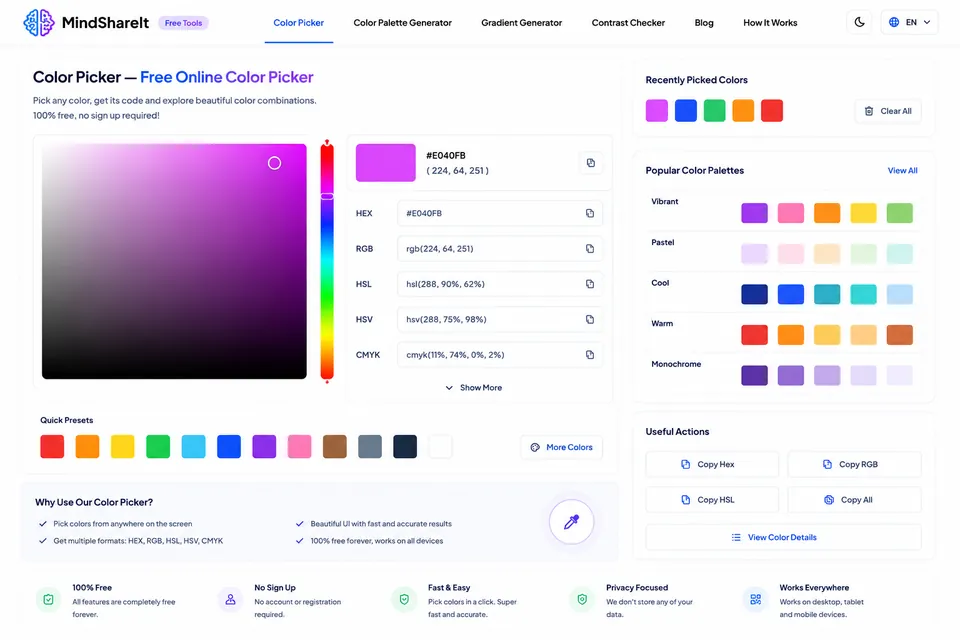
How to Use Color Picker
- Click anywhere inside the interactive color spectrum gradient or adjust the hue and alpha sliders to pick your base color.
- Alternatively, click the Eyedropper icon to sample exact color pixels from any webpage element or drag and drop an image to extract its dominant color palette.
- View instantaneous color conversions across HEX (#RRGGBB), RGB (rgb(r, g, b)), HSL (hsl(h, s%, l%)), and CMYK formats.
- Inspect the accessibility panel to check WCAG 2.1 AA and AAA contrast compliance against white and dark backgrounds.
- Click any color value card to copy the formatted code directly to your clipboard, or copy the generated CSS color variables.
Color Picker Features & Capabilities
- Multi-format color conversion: instant synchronized conversions between HEX, RGB, RGBA, HSL, HSLA, HSV, and CMYK
- Interactive eyedropper tool: sample exact pixel colors directly from your desktop screen or uploaded images
- Automated palette generator: generate complementary, monochromatic, analogous, triadic, and tetradic color schemes
- WCAG accessibility checker: evaluate contrast ratios for normal and large text against light and dark backgrounds
- Image palette extractor: drop any image (PNG, JPG, WebP) to extract dominant colors and accent swatches
- Developer-ready export: 1-click copy for CSS hex codes, RGB functions, HSL declarations, and Tailwind color tokens
Understanding Digital Color Spaces: HEX, RGB, HSL & CMYK
Digital design and development rely on multiple color models, each optimized for specific media and workflows:
• HEX (Hexadecimal): A six-digit alphanumeric code (#RRGGBB) representing red, green, and blue light intensity from 00 to FF (0 to 255). HEX is the universal shorthand for web CSS styling, HTML markup, and UI design tokens.
• RGB / RGBA: Defines colors as additive light mixtures of Red, Green, and Blue on a scale from 0 to 255, with an optional Alpha channel (0.0 to 1.0) governing transparency. RGB directly mirrors how computer monitors and OLED smartphone screens render light.
• HSL / HSLA: Represents color in terms of Hue (0–360° on the color wheel), Saturation (0–100%), and Lightness (0–100%). HSL is preferred by UI designers because creating hover states, disabled tints, and harmonious shading merely requires adjusting lightness without altering the underlying hue.
• CMYK: Subtractive color model (Cyan, Magenta, Yellow, Key/Black) used for physical offset printing. Converting screen colors to CMYK helps designers preview print output accuracy.
WCAG Color Contrast & Accessibility Compliance
Modern web design standards mandate that user interfaces provide adequate color contrast between text and background elements so content is accessible to visitors with low vision or color vision deficiencies. Under Web Content Accessibility Guidelines (WCAG 2.1):
• Level AA (Standard): Requires a minimum contrast ratio of 4.5:1 for normal body text and 3:1 for large text (18pt+ or 14pt bold).
• Level AAA (Enhanced): Requires an enhanced contrast ratio of 7:1 for normal text and 4.5:1 for large text.
Our color picker includes live WCAG score calculation, letting you test your selected foreground and background colors before writing a single line of CSS.
Extracting Color Palettes from Images & Screenshots
Capturing the color mood from reference photography or competitor branding is a core design workflow. Simply drag and drop any PNG, JPG, or WebP graphic into our image palette extractor. The algorithm clusters pixels using quantization, identifying the dominant primary color, secondary accents, and subtle neutrals, and outputs a downloadable palette ready for design systems.
Color Picker Frequently Asked Questions
Is this color picker free to use?
Yes. ToolSphare’s color picker is 100% free with unlimited color conversions and palette generations.
How does the eyedropper tool work?
Click the Eyedropper icon to activate the native browser EyeDropper API. Click anywhere on your screen to sample that exact pixel’s HEX code.
Can I use this tool to create accessible website colors?
Yes. The built-in contrast checker automatically evaluates your color combinations against WCAG 2.1 AA and AAA compliance benchmarks.
Can I copy colors directly into CSS and Tailwind?
Yes. With one click you can copy HEX values, rgb() functions, hsl() functions, or complete CSS custom property definitions.
